Showing posts with label tips. Show all posts

20 July 2022

How to stop emails from going to Spam in Gmail

If an important email has gone into Spam in Gmail, do this.

1. When you open the email, look for 3 vertical dots (probably beside 'Reply', but it may depend on what layout you use). Click the 3 vertical dots.


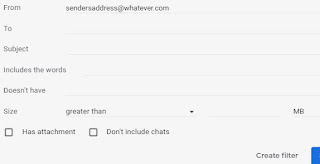
2. Select 'Filter messages like this'.

3. In the screen that opens, the sender's email address probably appears in 'From', but if not, type it there - or enter other details if you wish.


4. Click 'Create filter'.

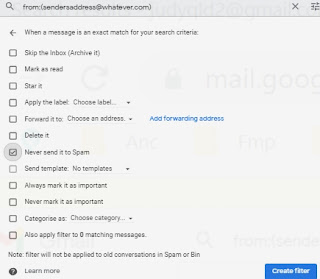
On the screen shown below...

5. Tick 'Never send it to spam'.

6. Click 'Create filter'.


Due to the havoc caused by a spammer, I've had to delete an email account that I previously used when sending research reports, e-books and mini-guides. My current business address is always on the 'About' page on my website.

(This post first appeared on https://genie-leftovers.blogspot.com/2022/07/how-to-stop-emails-from-going-to-spam.html.)

14 January 2022

Problems with Online Family Trees

Yesterday my cousin asked me to look at three online trees that (he said) included our ancestors.

I found that one tree belongs to a known relative with whom I exchange information. The second is a tree with which I'm familiar. It contains little-known details that have apparently been copied from my website (without acknowledgement - sigh). The third tree is one that I hadn't seen before, so I took a closer look.

It claims that Francis Alexander MILNE (born 1880, died 1955) was a son of William Francis MILNE and Colina Campbell McCALL. Colina is our relative (a descendant of our CAMPBELL ancestors from Tiree, Argyllshire, Scotland). Colina was born in 1889, so she can't have had a son born in 1880 - nine years before she herself was born! (Sigh)

At that point I was tempted to turn off the computer, but in fairness to my cousin, I double-checked my own research.

The death notice for William Francis MILNE who died in 1943 (husband of Colina) says that his children were Ian and Joan. Colina's death notice says the same (Sydney Morning Herald (NSW), 18 Oct 1960). So... no Francis.

I therefore concluded that descendants of Francis Alexander MILNE (1880-1955) are not descendants of our Colina Campbell MILNE nee McCALL. I added a comment to the tree, citing my evidence. I wonder whether anyone will read it.

Last year I posted a similar cautionary tale on my Facebook page:
Ancestry's trees drive me crazy. I added this comment to one: 'Sarah Jane NICHOLSON is my great-great-grandmother. Your tree says her father was Richard NICHOLSON, born c.1781, who married Mary MILLER 27 Feb 1775. That's impossible. He can't have married before he was born. And the Mary MILLER who married Richard NICHOLSON in 1775 cannot be the mother of my Sarah Jane NICHOLSON born c.1830, because by then Mary would probably have been in her 70s.'
Sigh.

Just to be clear... you'll find mistakes like this in many family trees, not just those on Ancestry. In my experience, though, the problem is worse on Ancestry, probably because they make it so easy to copy someone else's data into your own tree without checking that it makes sense.

(This post first appeared on https://genie-leftovers.blogspot.com/2022/01/problems-with-online-family-trees.html.)

17 November 2020

Tips on Sending an Email to Multiple People

Image by farconville (freedigitalphotos.net)
If you want to send the same email to multiple people, put your address in the To: field, and put all the other addresses in Bcc: (blind carbon copy) so that they are hidden. Do NOT put them in To: or Cc:, where they are visible to everyone else.

Today I received a blank email with 'Test message' as the subject line, and (in 'To:') the names and addresses of about a hundred people whom I don't know. That is a serious breach of privacy - and the sender has also left all of us open to spam. To make matters worse, I am now receiving emails from other recipients, because they used 'Reply to All' instead of just 'Reply'.

Not happy!

(This post first appeared on https://genie-leftovers.blogspot.com/2020/11/tips-on-sending-email-to-multiple-people.html.)

31 July 2020

Why You Don't Get Replies from Ancestry Users

If you're waiting... and waiting... and waiting for a reply to your message to an Ancestry user, this may explain why.

When Ancestry introduced the new messaging system, I was annoyed that I no longer received email notifications about incoming messages. I contacted Ancestry, and they explained how to overcome that problem:
As part of the new message system, we are attempting to cut down on the emails we send to our members. The sheer number we are sending in some cases is causing email domains to pre-filter our important emails out along with promotional [spam!] and this is causing considerable hardship.

We have changed the process, so that we only send out one email for multiple replies, and we only send an email when you have been logged out completely from our site for a while. This way, you are not getting emails while you are working, but can still view your new messages within your account as they come in.

If you just close your browser instead of logging completely out, the emails may not send at all, because your browser's active login cookie tells our site you are still signed in. To prevent this, simply click on your name or username at the top right and choose Sign Out.

Once you have been signed out for a little while, notifications will start coming through email again.

This works! I now log out each time I use the site, and I'm getting notifications again. But many people don't know about this, and our messages are just sitting in their inbox at Ancestry.

There are, of course, many reasons why someone might not reply to your message - but please share Ancestry's 'log out' explanation with your friends and family history groups.

See also the excellent advice in this post by Margaret O'Brien: In-Depth Guide - Chapter 9 - Send Ancestry Messages that get Replies.

Note that you have until 31st August 2020 to download and save your messages from Ancestry's old system.


This post first appeared on https://genie-leftovers.blogspot.com/2020/07/why-you-dont-get-replies-from-ancestry.html.

24 April 2020

Do Online Surveys to Earn Money for Genealogy

Image courtesy of digitalart (FreeDigitalPhotos.net)
If you have some free time, here's an idea that may appeal to you.

In recent years I have been able to spend more on family history (buying certificates, wills, subscriptions etc) because I earn money by doing online surveys.

Reputable sites do not generate spam emails or unwanted phone calls. Surveys are conducted by various companies, Government agencies, universities etc. Some surveys involve product testing, and I've enjoyed sampling (and giving my opinion on) items such as icecreams, cereals and teabags.

Some survey sites pay cash to your bank account or PayPal account. Others let you choose a gift card (Coles/Myer, Woolworths/Caltex, Amazon, iTunes, Bunnings, etc).

Survey panels to which I belong (updated Aug 2022) include:
  • Pure Profile: Available to residents of many countries. This site is my favourite, and (2022 update) I've earned $1,000 in one year here. Even if you are screened out of a survey, Pure Profile often pays you 5c-10c. Each time you log in, check what's currently available by selecting 'Surveys'. Even if it says 'Come back tomorrow', more surveys will usually become available at intervals throughout the day. The surveys will be more relevant if you answer the occasional 'profile' questions about your preferences and interests.

  • YouGov. Well designed surveys on a wide range of topics, and a good rewards system.

  • Australian Meal Panel: For Australians only. When asked for the 5 digit pin, enter 86127. Earn money by doing a 5-minute survey about food approximately every six weeks, and receive extra payments if you send in supermarket receipts. You will be paid via PayPal or by deposit to your bank account.

Don't despair if your earnings are low at first. Many surveys are targeted to specific groups, so you will increase your chances of being invited to relevant surveys if you answer the questions in your 'profile', update them periodically, and (if applicable) do the 'welcome survey' when you join.

(This post first appeared on https://genie-leftovers.blogspot.com/2020/04/do-online-surveys-to-earn-money-for.html.)

20 January 2016

Site Search / Navigation Tips (Wednesday's Webpage for Genealogy)

Top section of 'Site Search and Navigation Tips' Web page

This post is the first in my Wednesday's Webpage genealogy series. Each week I will focus on one page that either:
  1. lists names from indexes to original records in Archives or other useful sources

  2. describes genealogy sources or research strategies.

Selected pages from my main genealogy Web site will be included in this series, so it seems logical to start by looking at 'Site Search and Navigation Tips'. It explains how to get the most out of the site, which has more than 135 pages and 53,000 names, plus my own family tree.

Read the dot points on Site Search and Navigation Tips, then use the customised Google search box on that page to look for names or keywords.

(This post first appeared on http://genie-leftovers.blogspot.com/2016/01/site-search-navigation-tips-wednesdays.html.)

19 January 2015

Top 3 Things to Do before a Genealogy Conference (Tuesday's Tip)

Image by 89studio, FreeDigitalPhotos.net
To get the most out of a genealogy conference, there are three things you should do in advance.

If you are going to Rootstech, or Who Do You Think You Are? Live, or any other family history conference, do these now!

1.  Order your Contact Cards

Contact cards are a personal version of a business card. Give them to conference delegates who share your interest in a surname, locality or project, and use them to publicise your Web site, online family tree, genealogy blog or social media pages.

I order my cards from Vistaprint. Depending on what discounts are available and whether you choose 'Starter Business Cards' or 'Premium Business Cards', the cost of 250 cards is usually between $8 and $28. That's a great price for good quality cards, which you create by entering text into an online template. When you are happy with your design, submit the order, pay with either BPay, PayPal, VISA or Mastercard, and watch for the package to arrive by post.

Before you design your contact cards, consider what details you want to include. You won't be able to fit all of these, so make a list in order of importance to you.
  • Your name is essential, of course.
  • Your email address that will be valid long-term if you leave your current service provider. (The best option may be a free Gmail address from Google).
  • Your postal address (or at least your State and country).
  • Your Web site URL.
  • Your blog URL.
  • URL of your public online family tree - but check that it really is public and not locked away behind a pay wall on a subscription site.
  • Your social media URLs (Twitter, Facebook, Flickr etc).
  • Short list of surnames that you're researching, especially any unusual names. (Putting these on the back of the card costs a few extra dollars.)
  • Phone number (but if you list this, mention your time zone compared to Greenwich Mean Time).

I created this contact card with Vistaprint, and 250 of these only cost $7.99.


2.  Submit your research interests

Some conferences allow you to register your research interests, which are then published or displayed at the event. It's amazing how often a delegate finds someone else who is interested in the same family!

Use a spreadsheet to prepare each of your entries for easy cut-and-paste:
  1. Name/s (either surname only or with the family name first, eg, 'PEACOCK, Jonathan')
  2. Location (remember to specify the country)
  3. Time period
  4. Extra details.

3.  Plan what to take and what to do

There are lots of great tips in:
  1. Prepare Before Attending a Genealogy Conference (by Sue Maxwell).

  2. Rock Star's Guide to Genealogy Conferences (by Amy Coffin).

(This post first appeared on http://genie-leftovers.blogspot.com/2015/01/top-3-things-to-do-before-genealogy.html.)

13 January 2015

Genealogy Do-Over or Source-Based Incremental Fix?

Image by Stuart Miles, FreeDigitalPhotos.net
Recently there has been a lot of discussion about the 'Genealogy Do-Over' or 'Go-Over' proposed by Thomas MacEntee. I am taking a different approach. I'm doing a 'source-based incremental fix'.

Starting again from scratch is not an option for me because...

  • Some archival records that I used are no longer open to the public. The Government has since changed the access restrictions.

  • Talking to relatives in the 1970s gave me vital details that I have never found in documents - and those relatives are now in Heaven.

  • Many records that I used are on the other side of the world. They are not indexed and not digitised.

  • I have never copied details from online trees, and I never will. I might treat them as clues for further research, but that's all. About 90% of my research was done in the 1970s and 1980s, long before I had Internet access, and I used original records in State and national archives. I have since used a wide range of online resources, but I have not found any mistakes in my original research.

Louis Kessler has suggested a source-based incremental fix, which will suit me perfectly. Taking one document at a time, I will analyse it carefully and check that every bit of information has been extracted and entered into my family tree programme, with the source reference. Then I'll file the source in a new and separate location. As I work, I'll note gaps in my knowledge and list my ideas for further research.

First, though, I need to decide how to organise my records. This is what I've done so far (and no.5 is actually the most important).

  1. I've gathered together all my paper documents and research notes.  There are fifteen ring binders and one archival quality photo album from which data has already been added to my genealogy programme (The Master Genealogist). There are also two 52 litre storage boxes with countless unscanned photos and unprocessed photocopies and research notebooks. Eeek!  (Note to self:  Don't panic.)

  2. I've read Nancy Loe's guides.  These three e-books are very practical: Organizing Genealogy Research Using Archival Principles;  Cataloging Digital Family Photographs and Records; and Simplifying Genealogy Sources and Citations.

  3. I've read those guides again, this time making notes about how I'll modify Nancy's method so that it fits the way I think when I look for records in my files.

  4. I've downloaded source checklists for Evernote, via CyndisList. (Thanks to Michelle Patient for bringing these to my attention.)

  5. I've started creating a 'style guide' to ensure that I name and store files (especially digital files) consistently. (Nancy Loe says, 'Using controlled vocabulary is the single most important thing you can do to keep your research organized.')
(This post first appeared on http://genie-leftovers.blogspot.com/2015/01/genealogy-do-over-or-source-based.html.)

Order of words in a blog post title - why it matters (Tuesday's Tip)

Image by Stuart Miles, FreeDigitalPhotos.net
Does the order of the words in a blog post's title make any difference to how many people read that post?

Probably!

Why?

https://yoast.com/articles/wordpress-seo/ says, 'Search engines put more weight on the early words, so if your keywords are near the start of the page title you are more likely to rank well. People scanning result pages see the early words first. If your keywords are at the start of your listing your page is more likely to get clicked on.'

http://moz.com/learn/seo/title-tag says, 'The closer to the start of the title tag a keyword is, the more helpful it will be for ranking ­and the more likely a user will be to click them in search results.'

So...

   Kitty (Catherine) ASHTON: ancestor #1 of 52

is probably a better title than

   52 ancestors in 52 weeks challenge: #1 Kitty (Catherine) ASHTON.

And yes, there really is a blog post about Kitty ASHTON (my great-great-great-grandmother) who married Peter MATTHEW in Yorkshire, England.

(This post first appeared on http://genie-leftovers.blogspot.com.au/2015/01/order-of-words-in-blog-post-title-why.html.)

31 December 2014

Using LostCousins for genealogy (UK, Ireland, USA and Canada)

LostCousins logo
LostCousins is probably the only Web site that identifies (with virtually 100% accuracy) people who share the same ancestors. You do not waste time corresponding with people who are not related to you! I've found several new relatives via the site.

To use LostCousins you need to find your relatives in the census for England and Wales 1841, 1881 or 1911; Scotland 1881; Ireland 1911; Canada 1881; Newfoundland 1921; or United States 1880 or 1940. Then at LostCousins you enter the census source/page details for those names.

Before gathering and entering data, read the instructions on LostCousins very carefully ('Information - Read this first') because requirements for each census are different. If you prepare well, entering the data is a lot quicker.

Be sure to enter census data for brothers and sisters of your direct ancestors, because their descendants are the cousins you want to contact. One such descendant had a family bible and a letter from my great-great-grandfather, which overcame a dead end in my research.

After entering your relatives' census references, click 'Search', and the system checks whether anyone else has already entered identical data. If they have, it means that you are both researching the same people.

Remember to log in periodically, go to your 'My Ancestors' page and click 'Search' again to check for matches with new LostCousins members.

It is free to join LostCousins and enter your data, but you can, if you wish, pay a small annual subscription (about $10) so that there are no delays in making contact with my distant cousins when they are identified by the extremely accurate matching system.

The more people who enter census data for direct ancestors and their siblings, the greater the chances of finding our 'lost cousins'. Maybe you are my distant relative! I'm trying to find you - so please... start using LostCousins today!
- - -
(This post first appeared on http://genie-leftovers.blogspot.com.au/2014/12/using-lostcousins-for-genealogy-uk.html.)

28 January 2014

Finding Broken Links (Tuesday's Tip)

This is how I tackle the problem of finding links that need to be changed:

  1. I periodically use W3C's free link checker to identify broken links in my blogs and Web pages.

  2. I have downloaded and sometimes use Xenu's Link Sleuth.

  3. The HTML code for each of my Web pages is saved in a folder on my hard drive; and the HTML code for my blog posts (copied and pasted from the HTML tab while editing in Blogger) is saved in the nifty little programme Treepad. If someone tells me that a domain address or specific URL has changed, I can easily find out exactly where that link appears in my blogs or Web pages. I simply use the powerful search functions in Treepad (for my blogs) and Powerdesk (for text files with the HTML code for my Web pages).

Have you found other ways to tackle the problem?

(You can see more of my tips here. 'Tuesday's Tip' is a theme used by 'Geneabloggers'.)
~~~

14 January 2014

Headstones and Distant Burials (Tuesday's Tip)

headstone of George and Mary Hudson
George Hudson is William's son
The fact that a person's name appears on a headstone does not necessarily mean that he or she is actually buried there. Many headstones include the name of a family member buried in another town or another country. Sometimes the inscription makes that clear, but in many cases it does not.

There is a headstone for my great-great-grandfather, William HUDSON (1806-1882) in the churchyard at Crambe, North Yorkshire, England. I had no idea that he was actually buried in Linthorpe Cemetery at Middlesbrough - until I found a funeral card among family documents.

Depending on the geographical location, records that may specify the place of burial could include a death certificate, will, inquest file, newspaper notice, memorial card, or a church, cemetery or local government burial register. (Indexes to many headstones and burial registers are now on Findmypast.)

Records created by undertakers and funeral directors are another source of information about the place of burial. In Australia, many genealogical groups have indexed such records for their local area. Some are listed in Specialist Indexes in Australia: a Genealogist's Guide.

The records of Gregson and Weight (funeral directors in Queensland, Australia) refer to burials or funeral services that took place as far away as New Zealand, the United Kingdom, Ireland, Fiji, Sweden, Greece, Hungary, Austria and the Netherlands.

Have you found other sources of information about distant places of burial?
~~~

01 July 2012

B is for Birth Place

Continuing with the Family History Through the Alphabet challenge...

B is for Birth Place.

Sources from which I have discovered an exact place of birth (a town or parish) include:
  1. census records
  2. names of family houses or farms
  3. death certificates
  4. marriage certificates in Queensland, NSW or Victoria
  5. birth certificates of the subject's children born in Queensland, NSW or Victoria
  6. hospital admission registers
  7. benevolent asylum records
  8. mental asylum records
  9. military service records
  10. inquest files
  11. documents in Supreme Court probate files (see 10 Tips for Wills, Intestacies and Probate).
  12. newspaper notices (marriage, death, obituary etc.)
  13. newsletters / magazines published by clubs, churches, societies or occupational groups
  14. headstones
  15. memorial plaques in churches
  16. cemetery burial records
  17. church registers of baptism, marriage and burial
  18. Police Gazettes
  19. Police Station and Police Department records
  20. naturalisation records
  21. registers of teachers
  22. police staff files
  23. files on dentists who had difficulty being recognised by the Board
  24. immigration records (especially 20th century)
  25. personal family papers, diaries, letters, bibles etc
  26. any of the above records for the subject's brothers or sisters.

These are just the sources that I can think of right now. Some of these sources are online at FindMyPast (that link goes to a full list of their record sets worldwide).

Where else have you found a reference to the exact town or parish in which a person was born?

You will find more tips for family history in my other articles in this series. If the information and advice is useful, have a look at this page.

30 January 2011

Natural Disasters and Family History

If a natural disaster occurred today, would your family history records survive?

In Hurricane Katrina and the Canberra bush fires, three of my clients lost everything. I was able to send replacement copies of my reports, plus the genealogical data and certificates that accompanied their requests - but many professional genealogists do not keep client files for very long.

During the past month (January 2011), five Australia States have been affected by catastrophic floods, and an 'inland tsunami' destroyed one small town. Several other towns were hastily evacuated by helicopter. 75% of Queensland (an area larger than Texas) has been declared a Disaster Area. Now three cyclones (one potentially a Category 5) are expected to cross the coast in Queensland and Western Australia within five days. Severe weather events are becoming more frequent, and they are occurring in areas that have not traditionally been at risk. If you live in an area where bush fires, cyclones, hurricanes or tornadoes are common, you may be ready. The rest of us? Maybe not.

In the recent floods, electricity and mobile phone towers went out very early in some areas. Many people could not be warned to evacuate because they did not have a standard (non-cordless) telephone or a battery-operated radio. (Let that be a lessen to us all!) In pouring rain, with flood waters approaching Brisbane, I helped a friend prepare to move some of her belongings to storage on high ground. She has 10,000 books. Where to start packing?! That story had a happy ending, but it certainly made me think.

I live a long way from the river, but a major flood extends into large creeks, which could flow back into the small creek behind my house. If local heavy rain had continued, creeks would have been full before the flood peak arrived, and I might have had water through my house. As a precaution, I loaded the car with important personal and business documents, family history folders and notebooks, photos, laptop computer, data backups, mobile phone and charger, torch, radio, spare batteries, clothes, toiletries, medications, sheets, towel, pillow, blanket, and some food and water. Inside the house I lifted as many things as possible onto benches and tables.

It turned out to be total overkill, but it was good practice. For future reference, I have made a list (in order of priority) of other things that I would try to save if I had time. High on my list would be irreplaceable mementos from my travels (handcrafted wooden and pottery miniatures) and the beautiful beefwood fruit bowl, magazine rack, picture frames, coffee tables and book cases that my father made from timber he felled on the grazing property where I grew up.

Many websites have advice on disaster preparedness. As a family historian, I have some additional comments:
  • Think about what is stored where. Should items in lower shelves and drawers be moved higher?
  • If you only had minutes to grab books, could you find the ones you treasure most?
  • Some disasters wipe out an entire town. Store one electronic backup locally and another much further away, preferably interstate.
  • If you have a free account with Google, Yahoo, Hotmail etc, send yourself emails with important files attached, and save them there. You can retrieve them from any computer with Internet access (eg, at a library).
  • A free Dropbox account provides a secure offsite backup for items that would be expensive or impossible to replace, and it's a great way to share documents or photos with relatives or friends.
  • Print a copy of the advice on Guide to Salvaging Water Damaged Documents, and store it in your Emergency Evacuation Kit (with some freezer bags).
  • If your computer is submerged, it may still be possible to retrieve data from the hard drive.

24 September 2010

Sassy Jane Genealogy (Follow Friday)

'Follow Friday' is a theme used by 'Geneabloggers'. This week my suggestion is Sassy Jane Genealogy.

Here you will find practical advice from a family historian who is also a librarian and archivist. Pay particular attention to posts with 'Wisdom Wednesday' in the title. Items that I liked include:

19 September 2010

Genealogy conference papers (Sources Sunday)

From time to time, using my theme 'Sources Sunday', I talk about a source that I have used for genealogy. It may be a specific source or series in a record office; a book; or a library, museum etc as a source in the broader sense. You won't see 'Sources Sunday' here every week because it is sometimes in one of my other blogs (which are listed in the sidebar).

This week I am recommending published papers of genealogy conferences to help you locate and understand a wide variety of sources. Well-known overseas speakers (and locals with expertise in overseas research) present papers at the Australasian Congress on Genealogy and Heraldry and some small conferences here - so wherever you are in the world, have a look at the Web page listing topics covered at six major conferences. Some of the papers on Irish and English research are outstanding.

16 September 2010

Newspapers, birthdays and Christmas gifts

What was happening in the world on the day your grandfather was born?

A good family history is one that includes historical context, and newspapers are an obvious resource. My 'list of things to do' includes 'Find a newspaper for the day each of my direct ancestors was born and died'.

I once researched a person who died in Sydney NSW at the age of 103. Normally I would have expected to find a short paragraph in the newspaper, but the death was completely overshadowed by reports of the dramatic opening of the Sydney Harbour Bridge!

A few years ago, as Christmas gifts for my father and sisters, I laminated A3 photocopies of the front page of a major local newspaper for the day each of them was born. My father was born in 1919, and his page was filled with stories about the aftermath of World War I. My youngest sister was born during a cyclone, and the newspaper reports prompted Dad to tell us some interesting tales about rushing to the hospital in cyclonic conditions.

I hasten to add that important documents should never be laminated, as explained in 'Step away from the laminator!' The A3 pages I laminated were not for long-term preservation. They were just inexpensive gifts (which are used as place mats for informal family meals!)

25 July 2010

10 Things I Can't Live Without

In the discussion ('meme') 10 Things I Can't Live Without (related to genealogy), nine of Elyse's ten things require a computer. My list is very different - possibly because I did most of my research in the 1970s/80s! Genealogy is certainly easier and more fun if you have a computer, email, the Internet, and the ability to visit local libraries or LDS Family History Centres - but a lot can be accomplished without them. Just ask any genealogist who is a full-time carer or physically unable to get out and about.

I am often without a computer for a week or so, but I can still work on my family tree if I have:
  1. The family history 'book' that I wrote on a typewriter in the 1980s. It has a lot of my data, detailed source references and a bibliography.
  2. Address book and Correspondence log (I can write letters on paper to relatives or repositories); 'Style sheet' to remind me how my filing system works; 'Where Is It?' index book.
  3. Small magnifier; 2B pencils; enclosed pencil sharpener (so I can put it in my pocket at repositories); good quality coil-bound notebook (A5 or A4); 4-ring binders and copysafe page protectors.
  4. Camera. Preferably digital, but an old SLR and a roll of film will do.
  5. Pedigree Charts and Family Group Sheets. With these I take a summary of names, dates, places etc to repositories where I cannot take a computer.
  6. Maps, including the Ordnance Survey Motoring Atlas of Great Britain. It shows rivers, hills etc that may influence where people went to market, church etc, and has a good place name index.
  7. The Macquarie Book of Events (Bryce Fraser). I can put my ancestors' lives in context if I know what was happening in Australia. The book covers Discovery, Settlement, People, Transport, Communications, Industries, Trade, Taxes, the Economy, Work Force, Regal/Vice-Regal, Politics, Law, Defence, Education, Religion, Health, Social Welfare, Science, the Environment, Arts, Disasters, Sport.
  8. Ancestral Trails: The Complete Guide to British Genealogy and Family History (Mark D. Herber).
  9. The Phillimore Atlas and Index of Parish Registers. Parish maps, topographical maps, location of parish registers/indexes (England, Scotland, Wales).
  10. Newspapers in Australian Libraries: a union list. Part 2: Australian newspapers. Often quicker than the Internet if you want to know what newspapers were published when/where and the location of copies.
Before I go travelling without a computer, I use my genealogy software (The Master Genealogist + SecondSite) to create (on a USB flash drive) a family tree in HTML format. I omit living people for privacy reasons. If I am visiting friends or a public library, I can usually look at my tree (which is just a series of Web pages) on their computer.

What would you put on a 'Top Ten' list of things you need for genealogy?

24 July 2010

Reading Handwriting (52 Weeks to Better Genealogy, no.29)

Challenge no.29 in '52 Weeks to Better Genealogy' was, Practice reading handwriting. Deciphering the penmanship of our ancestors is an exercise in patience, but this is a great skill to have.

Family historians love indexes, but most indexing errors arise from difficulty in interpreting handwriting. If the first letter of the name is indexed incorrectly, you will not find that entry unless you 'think outside the box'. To help you do this, my Web page on using and compiling indexes has examples of letters that are commonly misinterpreted and names that have been incorrectly indexed. It also warns of other indexing mistakes, such as incorrect sorting of names, listing a person's middle name instead of their surname, listing 'Senior' or 'Junior' as a surname, etc. (I was honoured when Shauna Hicks recommended this page in her book Family History on the Cheap.)

Here's an example of an indexing error due to semi-legible handwriting:
Ancestry's index got it wrong!
It's Fredk, not Freak.
There is always something new to learn, but indexing tens of thousands of names from old documents at Queensland State Archives has given me lots of practice. About 51,000 of those names are on my Web site.

('52 Weeks to Better Genealogy' is a series of tasks devised by Amy Coffin.)